
Secure file sharing for small business
Send files to clients securely, receive documents and working materials from them, and present your business under your own branding. Keep sending and receiving in one place, track downloads, and work easily with your team, clients and suppliers.
 Secure file sending
 Receive files from clients
 Your own branding
 Track downloads
 Recipient verification by SMS
Sending and receiving files as part of your business's daily work
Share files with clients, receive their materials and track the downloads. Here is how it looks in three kinds of small business:
Clients upload their year-end documents through the office's form. The team gathers the submissions and sends back the finished statements under the office's branding.
The team sends drawings and models to clients and contractors, with no splitting files to fit email limits, and tracks the downloads.
Receive photos and raw materials from the client, and send videos and campaign files through a download page under the agency's branding.
JUMBOformsReceive files and details from clients in one branded form, with JUMBOforms
Let clients fill in details and upload documents and working materials, with no account. Every submission reaches your Inbox with the files and details provided, and you get an email alert when the upload is complete.
- Fit the form's fields to your business: client name, client number, project and document type.
- Set which file types can be uploaded and how many files each submission can include.
- Share the form with your team and export the list of submissions to Excel or CSV.
 Start a projectBusiness branding
The whole team sends. Your brand stays consistent.
Show clients your business on every file you send and receive. Your logo and branding appear on upload and download pages and in emails, for a professional, familiar experience from every team member.
Your business's own domain at the Enterprise One service level.
 Outlook add-in
Send files directly from Outlook
Send proposals, drawings and videos with JUMBOmail, directly from Outlook. Choose the files through the add-in and add a download link to your message, without switching systems.
Hi Lena, here are our proposal for the café and its appendices. We look forward to your comments.
 Download the proposal files3 files, 23 MB
 Users and permissions
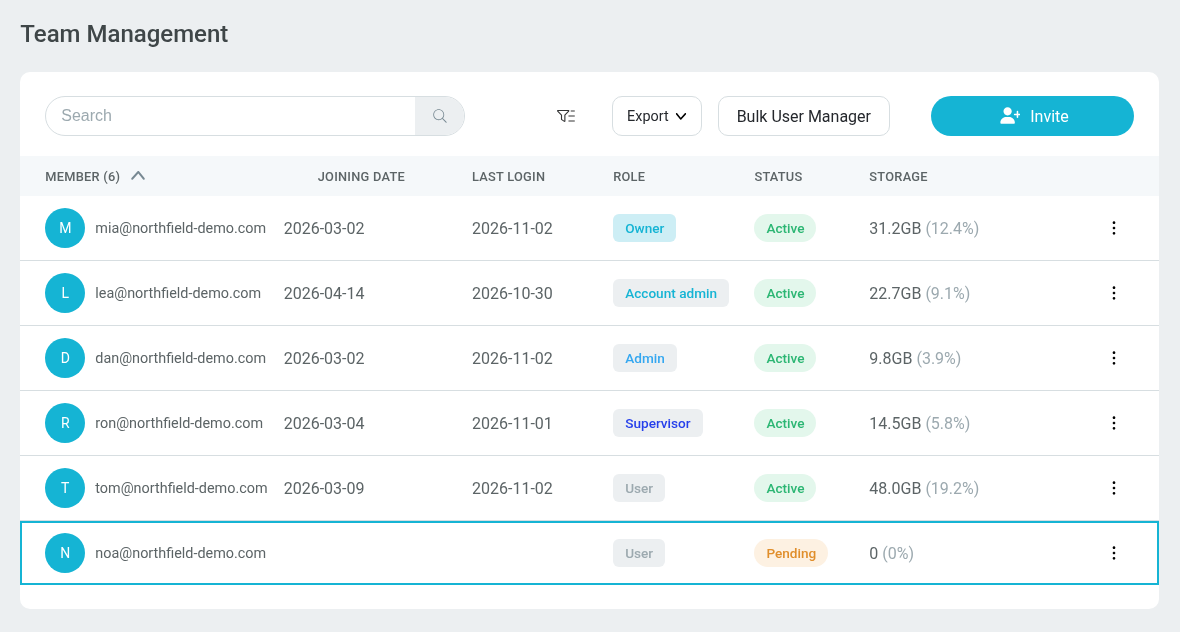
The whole team works together. You manage the permissions.
Add employees to your business account and set permissions for each one according to their role. Keep user management and tracking of the team's deliveries in one place, with access to information according to the permissions you set.
- Add and remove users and update their permissions.
- Track the team's activity and deliveries according to each permission level.
- See how much storage the business and each user use.
Everyone sees according to their permissions
Mia, as Owner, sees the whole team's deliveries and manages the organization's settings and licenses.
- Harbor St. café: drawings set ADownloaded13d2 Downloads | 3 Views
12 files | 248.6 MB - Elm Ave. house: model v4Pending download12d0 Downloads | 1 Views
3 files | 1.2 GB - Proposal: Harbor St. caféDownloaded12d1 Downloads | 2 Views
2 files | 8.4 MB - Supplier invoices, OctoberDownloaded11d1 Downloads | 1 Views
6 files | 3.1 MB - Site photos: Elm Ave.Downloaded10d3 Downloads | 4 Views
64 files | 412.0 MB - Elm Ave. house: revised planDownloaded9d1 Downloads | 1 Views
1 file | 18.7 MB
 File retention
How long files are kept, according to your business's needs
Set how long the files you sent are kept, so clients and your team can return to project materials and documents later in the work.
Retention options depend on your plan. One policy for the whole team, and custom periods under an Enterprise agreement.
Recipient verification by SMSRecipient verification by SMS before sensitive documents are downloaded
Send reports, agreements and business documents with extra verification before download. The recipient gets a one-time code by SMS or voice call, and the files open once the code is entered.
The code goes only to a phone number the sender set for the delivery.
 The code is sent to a mobile number.
 File sanitizationEnterprise
Receive files from clients and suppliers with an extra layer of protection
Invoices, documents and résumés reach your business from outside every day. The file sanitization service combines antivirus scanning and CDR technology to reduce the risk from harmful content in the files you receive.
The process includes scanning, neutralizing dangerous components and rebuilding the file, before it is available for your team to download.
Advanced options for your business
For teams that need central access management or, at the Enterprise One service level, a dedicated file environment, according to your business's needs and your service agreement.
 Single sign-onEnterprise
Sign in with your business's account
Let your team sign in with a Microsoft 365 or Google Workspace account, with no extra JUMBOmail password. Manage access according to your business's policy, and update permissions when a role changes or employment ends.

 Microsoft
 Standards and security
Security and compliance
Information on our ISO/IEC 27001 and ISO/IEC 27017 certifications, the SOC 2 Type II report, and security and privacy documents is gathered in our Trust Center.
External penetration tests and ongoing vulnerability scans help find weaknesses and improve the system's protection.
Password protection, recipient verification by SMS, download limits and download tracking, according to the options available in your plan.




 Private environmentEnterprise One
A private JUMBOmail environment for your business
At the Enterprise One service level: a file sharing environment set up for your business alone, under a domain your business owns, with dedicated storage separate from other customers. The JUMBOmail team manages setup and maintenance.
Learn more about Private JMQuestions small business owners ask us
Yes. You can use JUMBOmail on your own or add employees to a shared business account. Choose a plan by file size, storage needs, number of users and the capabilities you need.
Start with three questions: how many people will use the service, how large are the files you send, and what do you want to do. For example, send under your business's branding, collect documents from clients or manage a team. You can compare the plans or contact us for a recommendation.
No. There are plans for individual work and for small teams too. Enterprise is for advanced needs such as organizational sign-in and additional protection, and at the Enterprise One service level also a private environment, according to the service agreement.
No account is needed to download files from a regular delivery. The client opens the link they received and follows the access settings the sender chose.
With JUMBOforms you can create a form where clients fill in details and upload files with no account. The files and the details arrive together in your Inbox.
No. You can show the form on a JUMBOpage and send clients a link to it. On plans that support it, you can also embed the form in your business's website.
Yes. On the relevant plans you can add a logo and background image to the download page and design your emails. One branding for the whole team depends on the plan and solution you choose; your business's own domain and full White Label are at the Enterprise One service level.
No. On plans that support team management, you can buy user licenses under the business account and invite employees to join. Each employee has their own account within the business's plan.
Access depends on the permission level. There are five: Owner, Account admin, Admin, Supervisor and User. Owners, Admins and Supervisors see the whole team's deliveries in one view of the Inbox; a User sees only their own.
The account owner can suspend or remove the user in Team Management. Removing a user does not automatically cancel the license charge; changing the number of licenses is done separately.
Yes. You can send files and folders, including videos, drawings and project materials. The size limit per delivery depends on the plan.
You can track downloads in the delivery's details and get an email alert on download. The scope of tracking information depends on the plan.
Retention depends on the plan and the delivery's settings. Subscribers can save deliveries past their expiry within their storage, and on the relevant solutions you can also set a retention policy for the team.
On the relevant plans you can protect a delivery with a password, limit downloads or restrict access to specific recipients. Recipient verification by SMS is available under Enterprise when the service is enabled on the account.
See it with your business's setup
Leave your details and we will show you JUMBOmail with your business's name, logo, team and sign-in method. No IT person needed on your side: we set it up with you.
Have an IT team? JUMBOmail for organizations
We use your details only to get back to you. Privacy Policy


