Is it possible to track when and who downloaded the files I sent?
Yes, JUMBOmail users can know the date and time the files were downloaded, as well as who downloaded them by their email and IP address.
In order to receive information about the downloads, you must log in to JUMBOmail and also you need to make sure that the email was sent while you were logged in (free registration).
You can get the information about who downloaded the files you sent in the "Inbox/Outbox" area by clicking on the number of downloads that appear on the top right of each line of the email.
In addition, the information can also be obtained from the file download page sent:
1 - Go to the requested download page. This page can also be accessed from your JUMBOmail Inbox / Outbox.
2 - Click on the info icon 'i'

3 - Click on the "View download log" link

4 - Get the information you looked for
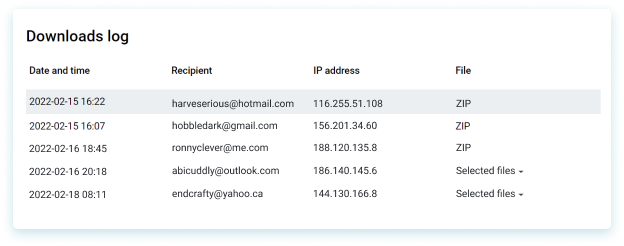
Registered users can receive information only about the first 2 downloads of the email.
Subscribers can track all downloads without any limits.